
Migrate from nginx or Nginx Proxy Manager
Existing nginx sites can be imported into Gately as listeners and sites. You verify them next to nginx, switch over, and if something goes wrong you go back to nginx. Configs generated by Nginx Proxy Manager (NPM) import the same way, including proxy hosts, redirection hosts, access lists and forced HTTPS.
When to use this, and what you need
- You run nginx as a reverse proxy, static server or HTTP-to-HTTPS redirect and want Gately's Web Services to take over.
- You can run
nginx -Ton the nginx host, and Gately can reach the sites' backends. - nginx and Gately cannot listen on the same port at the same time, so you test on another port first and swap ports as the last step.
- Certificates are not part of the import. Issue new ones with Gately (see Wildcard certificate and DDNS), or let Gately read the certificate files nginx uses now.
What you end up with
- Each
listenport becomes a Gately listener and eachserverblock a site. Common directives such asproxy_pass,root,return,location,allow/denyandadd_headerare converted. Imported listeners and sites start out disabled. - You can go back at any time: disable the Gately listener and start nginx again.
Steps: plain nginx
1. Export the config
Run this on the nginx host and keep the full output:
nginx -T > nginx-T.txt
# when nginx runs in Docker
docker exec nginx nginx -T > nginx-T.txt
The output of nginx -T contains every included file, and Gately expands includes the way nginx does.
2. Preview and import
Open "Web → Web Services" and click "Import nginx" in the page header.
Paste the contents of
nginx-T.txtinto the box, or click "Read from file".Click "Preview". The preview groups sites by listening port and lists each site's type, backend or directory, source file and line, and anything that needs attention: directives that use variables, domains without a certificate, and the reason a site cannot be converted.
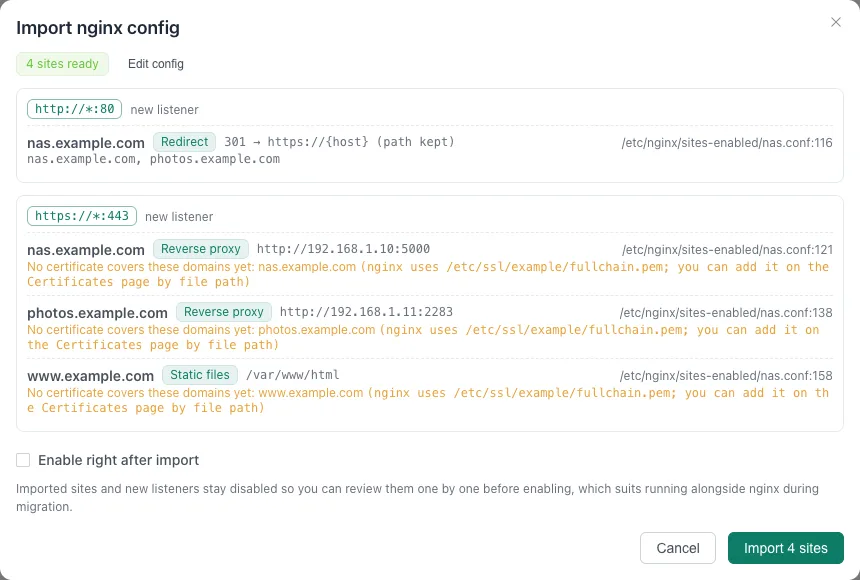
Leave "Enable right after import" unticked and click "Import N sites". Listeners are named "nginx :port" and marked "Imported from nginx config"; both listeners and sites are disabled. Importing again is safe, existing domains are skipped.
Converted directives include proxy_pass (with upstream weights, backups and balancing policy), root / alias static directories, return redirects and fixed content, add_header, proxy_set_header, gzip, allow / deny, per-location backends and access control, auth_request (becomes forward auth), auth_basic (becomes basic auth with shared users, which you must fill in), and listen ... proxy_protocol and quic. TCP/UDP forwarding in stream is set up under Port Forwarding. The full list is in Web Services · Import nginx config.
3. Prepare certificates
The preview lists the certificate files nginx uses. You have two options:
- Issue new certificates under "SSL Certificates", preferably a DNS-01 wildcard certificate.
- Keep using nginx's files: "Add certificate", source "Read from file", and enter the certificate and private key paths. Gately checks the files regularly and reloads them, which suits setups where certbot keeps renewing. When Gately runs in Docker, mount the certificate directory into the container.
4. Verify on another port first
While nginx still holds 80 and 443, make Gately listen elsewhere:
- On the Web Services page find the "nginx :443" listener, click "Edit listener", change the port to
8443, turn on "Enable" and save. - Click "Sort & batch" in the page header, tick the sites to test, click "Enable" in the toolbar, then "Done sorting".
- Reach Gately's port with
curland an explicit domain; no DNS change is needed:
curl -I --resolve nas.example.com:8443:127.0.0.1 https://nas.example.com:8443/Check each site's page, login, WebSocket and uploads or downloads. Adjust differences in the site's settings, for example tick "Skip backend certificate verification" for a backend with a self-signed certificate, and leave "Use backend address as Host" off when the backend needs the original Host.
5. Switch over
- Stop nginx (
systemctl stop nginxordocker stop nginx) to free 80 and 443. - Change the Gately "nginx :443" listener port back to
443and turn on the "nginx :80" listener. - Open the live domains and confirm.
- Decide about uninstalling nginx only after everything checks out.
Roll back
Turn the Gately listeners off and start nginx again (systemctl start nginx). Gately keeps the configuration, so you can fix the problem and switch again. Config history can also restore settings from before a change.
Switching site by site, without downtime
With many sites you may not want to move them all at once. Let Gately own 443 and hand the domains you have not moved yet to nginx:
Make nginx listen on local ports only and accept the PROXY protocol so visitors' real IPs survive. Change every
listen 443 ssl;tolisten 127.0.0.1:8443 ssl proxy_protocol;and port 80 likewise tolisten 127.0.0.1:8080;. Add this inhttpor in eachserver:nginxset_real_ip_from 127.0.0.1; real_ip_header proxy_protocol;Then reload nginx.
Import the config in Gately (step 2) and keep the "nginx :443" listener on port
443.On that listener click "Set default site": type "Reverse proxy", backend
https://127.0.0.1:8443, tick "Skip backend certificate verification", "Send PROXY v2 to the backend" and "Use the visited domain as SNI", then save. Every domain with no matching Gately site lands here and nginx keeps serving it.Turn the listener on. From then on, enable one Gately site at a time as you move each domain. Enabled sites are served by Gately and the rest by nginx.
If a site misbehaves, disable it. It goes back to nginx and no other domain is affected.
Steps: Nginx Proxy Manager
NPM generates plain nginx config, so it imports the same way; only nginx -T has to run inside the NPM container.
Export the config on the NPM host (replace
npmwith the name of the NPM container;docker pslists it):bashdocker exec npm nginx -T > npm-nginx-T.txtYou can also copy just the contents of
nginx/proxy_host/*.conf,nginx/redirection_host/*.confandnginx/dead_host/*.conffrom NPM's data volume; the NPM snippets they include are filled in automatically.Paste it into "Import nginx" and preview. NPM's own default page, 443 fallback and admin interface (port 81) do not show up in the preview.
Certificates: the preview names the certificate files inside the NPM container; handle them as in "3. Prepare certificates" above. With "Read from file", use the location of NPM's data volume on the host, for example
./letsencrypt/live/npm-1/fullchain.pem, and mount that directory into the container first when Gately runs in Docker.After the import, add the access list users again (see the table). Verification, switch-over and rollback are exactly as above.
What each NPM setting becomes:
| In NPM | After import |
|---|---|
| Proxy Host Scheme / Forward Hostname / Port | The backend address of a reverse proxy site, for example http://192.168.1.10:5000; https backends are not verified, as in NPM |
| Custom Locations | Per-path backends; a path in the Forward Hostname becomes "Strip path prefix" |
| Websockets Support, HTTP/2 Support | Nothing to set; Gately supports both automatically |
| Force SSL | The site of the same name on port 80 redirects to https://{host} with the path kept |
| HSTS Enabled / HSTS Subdomains | The Strict-Transport-Security response header |
| Cache Assets | Site cache: CSS, JS, images, fonts and other static assets are cached for 30 minutes, other paths are not cached |
| Block Common Exploits | Not imported; the preview mentions it once. If you want it, choose a WAF instance on the site's Security tab and start in detect-only mode |
| Access List IP rules | The site's IP allowlist or blocklist |
| Access List usernames and passwords | Basic auth with shared users; NPM's password file is not read, so add the users again in Gately. Nobody gets through until you do |
| Access List Satisfy Any | Only the authentication is imported and listed IPs have to sign in too (Gately cannot exempt IPs from authentication); the preview lists those IPs |
| Redirection Host | A redirect site with the same status code and "Keep path" setting |
| 404 Host | A fixed-content site returning 404 |
| Default Site (404, 444, redirect) | The default site of the port 80 listener |
| Streams | Not imported; configure them in Port Forwarding |
| SSL certificates (Let's Encrypt or custom) | Not imported; see step 3 |
What still does not convert: directives in custom nginx configuration under Advanced that have no Gately equivalent are listed under "Directives not converted" in the preview or produce a warning; regex location blocks, variables set inside if, and Lua do not convert either. Review those sites after the import and adjust them by hand where needed.
Verify
- After the preview passes, test every site's status code and content with
curl --resolve. - After the switch, open the sites and check that the browser shows a valid certificate and that WebSocket applications such as Jellyfin or Home Assistant work.
- Site cards show request and error counts, and site statistics show visitor IPs and the status code distribution.
- Once the imported listeners and sites are enabled, the run log shows
https listener :443 (N sites).
Troubleshooting
The preview says "Not imported" because there is nothing to convert. The backend uses variables whose value cannot be determined statically (for example set inside if or taken from a map with several entries), or the site uses regex location blocks or Lua. Create it by hand with the table above.
The listener fails to start because the port is in use. nginx still holds it. Stop nginx, or put the Gately listener on another port.
The import warns about a missing certificate. Certificates are not imported; follow step 3. NPM keeps its certificates under letsencrypt/live/npm-N/ or data/custom_ssl/npm-N/ in its data volume, where N is NPM's internal certificate number.
A site returns 502 after enabling. The backend address is unreachable from where Gately runs (with Docker use --network host or a routable address), or the backend is https with a self-signed certificate: tick "Skip backend certificate verification".
The application does not see the visitor's real IP. The site option "Add X-Forwarded-*" is on by default; the application has to trust Gately's address as a proxy. In the site-by-site approach nginx needs real_ip_header proxy_protocol as shown above.
Related
- Web Services: import nginx config, and the nginx-to-Gately mapping for replacing haproxy and nginx.
- Run everything on one port 443.
- Replace haproxy, nginx, fail2ban and acme.sh on a cloud server.