
Wildcard certificate and DDNS in 10 minutes
Your home or office IP changes, and you want one HTTPS setup for a family of names such as nas.example.com and photos.example.com. Two pieces do it: dynamic DNS keeps the names pointing at the current IP, and a single *.example.com wildcard certificate covers every subdomain. Gately issues it with DNS-01 validation, so neither port 80 nor 443 has to be open. There is a Cloudflare version and an Alibaba Cloud version below; follow the one that hosts your domain's DNS.
When to use this, and what you need
- A domain of your own, with DNS hosted at Cloudflare or Alibaba Cloud (Cloud DNS). Other providers work the same way; see the list in Dynamic DNS.
- Gately running, with outbound internet access (it talks to the DNS provider, Let's Encrypt and a public-IP lookup address).
- A real mailbox for the ACME account. Let's Encrypt rejects addresses on reserved domains such as
example.com, and the log then sayscontact email has forbidden domain. - This guide uses
example.comas the domain. Replace it with yours.
What you end up with
- The A records for
example.comand*.example.comfollow your public IP; Gately checks it regularly and updates them when it changes. - One certificate covering
example.comand*.example.comis issued by Gately and renewed automatically before it expires. - Any new
something.example.comsite in Web Services just works with HTTPS, with no further certificate request.
Steps
1. Create an API key at the DNS provider
DDNS and certificate validation both edit DNS records through the provider's API. Create a key just for Gately with DNS read/write permission only, not your main account key.
1. In the Cloudflare dashboard open My Profile → API Tokens and click Create Token.
2. Use the "Edit zone DNS" template, or set these two permissions yourself:
   Zone · Zone · Read
   Zone · DNS · Edit
3. Under Zone Resources choose: Include · Specific zone · example.com
4. Create the token and copy it (it is shown only once).1. In the Alibaba Cloud console open Resource Access Management (RAM) → Users, create a user
with "OpenAPI access" ticked, and save the AccessKey ID and AccessKey Secret shown
(the Secret is displayed only once).
2. Grant that user the system policy AliyunDNSFullAccess (full access to Cloud DNS),
or a custom policy limited to reading and writing records of your domain.The "Get credentials" link next to the provider in Gately's task and certificate dialogs opens the provider's key management page. Console menu names change when providers redesign them, so follow what you see on screen.
2. Add a dynamic DNS task
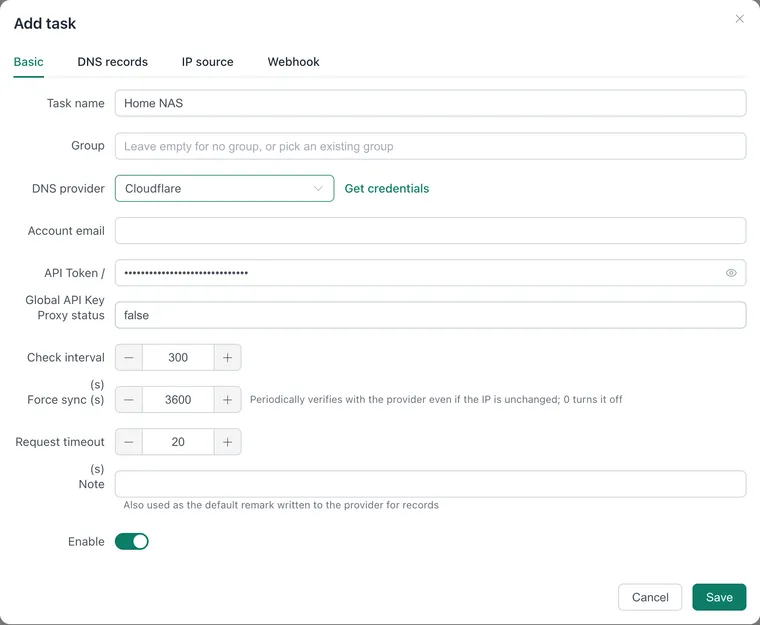
Open "Network → Dynamic DNS" in the sidebar and click "Add task".
On the "Basic" tab:
- Task name:
Home NAS. - DNS provider: "Cloudflare" for Cloudflare, "Alibaba Cloud DNS" for Alibaba.
- Credentials: for Cloudflare paste the token into "API Token / Global API Key" and leave "Account email" empty (the email is only for a Global API Key). For Alibaba fill "AccessKey ID" and "AccessKey Secret".
- For Cloudflare, set "Proxy status" to
falseso the records point straight at your IP instead of going through Cloudflare's proxy (the orange cloud). - Leave the rest at the defaults (check interval 300 seconds).
- Task name:
Open the "DNS records" tab. In the first row put
@under "Host" (the root domain; empty works too),example.comunder "Root domain", typeA, and keep the value{ipv4Addr}. Click "IPv4 record" for a second row with host*, root domainexample.com, value{ipv4Addr}.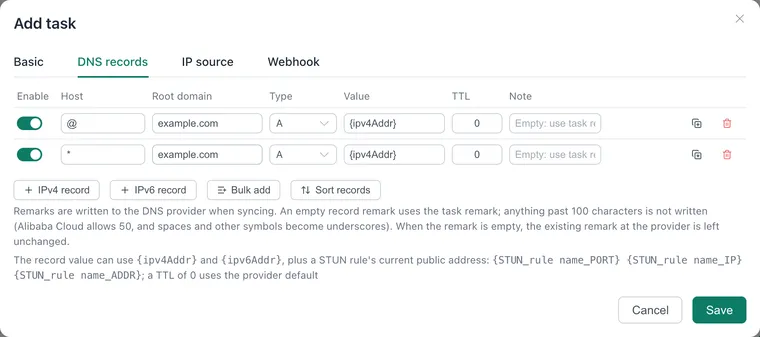
For IPv6 as well: on the "IP source" tab turn on "Get IPv6", then on "DNS records" click "IPv6 record", type
AAAA, value{ipv6Addr}.Click "Save", then "Force sync" on the task card.
On the "IP source" tab, "Query URL" is the default way to learn your IPv4 address. The listed URLs can be replaced with any service, including your own. Use "Network interface" instead when the device holds a public address itself.
3. Request the wildcard certificate
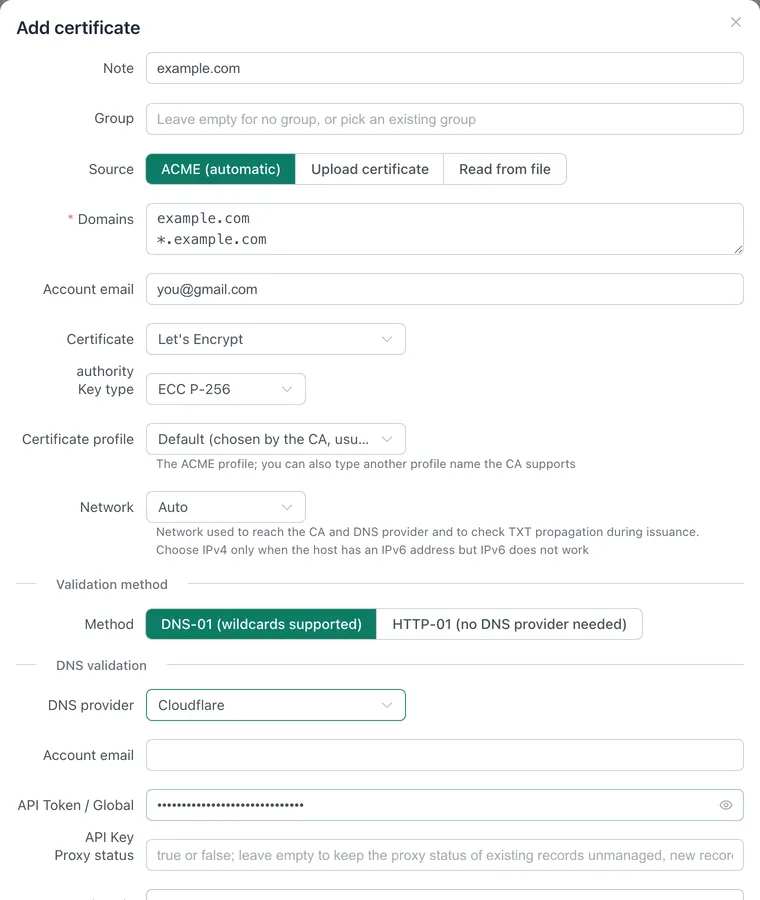
Open "Web → SSL Certificates" and click "Add certificate".
Keep the source "ACME (automatic)" and fill in:
- Note:
example.com(also the file name when mapping files; optional). - Domains: one per line,
example.comand*.example.com. A wildcard certificate does not cover the bare domain, so both lines are needed. - Account email: your real address.
- Certificate authority: Let's Encrypt. Validation method: "DNS-01 (wildcards supported)".
- DNS provider and credentials: the same as in the previous step (the token for Cloudflare, the AccessKey pair for Alibaba).
- Leave "Root domain" empty; Gately finds the zone that holds the validation record.
- Note:
Click "Save". Issuance starts in the background right away and the run log at the bottom of the page shows progress. Gately adds a
_acme-challengeTXT record through the provider API, waits for it to propagate, validates, and removes it. This usually takes one to two minutes.When the certificate card shows "N days left", issuance worked. Let's Encrypt certificates last 90 days and Gately renews 30 days before expiry by default; change it under "Renewal settings" in the page header.
4. Use HTTPS on your sites
- Open "Web → Web Services" and add a listener on port
443with HTTPS on. - On the listener's card click "Add site", enter
nas.example.com, type "Reverse proxy", your application's address as backend, and save. - Add
photos.example.comand any other site the same way. The certificate is picked automatically by domain from "SSL Certificates"; there is nothing more to set.
Forward external TCP 443 on the router to this machine, or let protocol routing own 443 and pass web traffic on to Web Services.
Verify
# DNS: returns your current public IP
dig +short nas.example.com
dig +short example.com

# Certificate: *.example.com in the subject alternative names, issued by Let's Encrypt
echo | openssl s_client -connect nas.example.com:443 -servername nas.example.com 2>/dev/null \
  | openssl x509 -noout -issuer -subject -ext subjectAltName -enddate
On the DDNS task card each record shows "Created", "Updated" or "Up to date" when sync worked. The certificate card shows the new expiry date.
Troubleshooting
Sync fails with a Cloudflare authentication error in the log (for example 6003 Invalid request headers). The token is wrong, incompletely pasted or revoked. Create a new one and paste all of it. Also make sure "Account email" is empty: with an email present, Gately authenticates as a Global API Key.
Sync fails with "domain not found in the Cloudflare account". The token lacks "Zone · Zone · Read" for that domain, or "Root domain" holds a subdomain instead of the zone.
Alibaba Cloud sync fails with a permission error. The RAM user has no Cloud DNS grant. Give it AliyunDNSFullAccess as in step 1.
Issuance fails and the log says contact email has forbidden domain. The account email is on a domain such as example.com that cannot be used. Enter a real address and save again.
Issuance waits for the TXT record to propagate and finally times out. When the host has an IPv6 address but IPv6 does not actually work, queries to the authoritative DNS servers time out; set "Network" to "IPv4 only". On networks in mainland China you can also enter 223.5.5.5:53 under "DNS for checks". If your domain is hosted elsewhere and only a subdomain is delegated to Cloudflare or Alibaba Cloud, put the delegated zone in "Root domain"; see DNS-01 validation.
The certificate works for subdomains but the bare domain shows a mismatch. The example.com line is missing from the domain list.
The Cloudflare orange cloud is on. With the proxy on, visitors reach Cloudflare instead of your IP, non-HTTP ports stop working, and upload size is limited. For a personal NAS, keep "Proxy status" at false.
Your IP changed but DNS did not follow. Gately checks every 300 seconds by default. Shorten the check interval in the task or click "Force sync".
Related
- Dynamic DNS: providers, record value variables, bulk record entry.
- SSL Certificates: HTTP-01, certificate mapping and automatic deployment to other hosts.
- Web Services.
- Reach a NAS without a public IPv4 address.