
Run everything on one port 443
Some networks only let 443 through, and some home connections give you a single public port, yet you want HTTPS sites, SSH and Remote Desktop all reachable from outside. Protocol routing looks at the first bytes each connection sends, recognizes the protocol, and hands the whole connection to the matching backend. One port, several services.
When to use this, and what you need
- You want websites, SSH, RDP (or OpenVPN, SOCKS and others) to share one TCP port. This guide uses 443.
- Nothing else is listening on 443 on this machine. If nginx, haproxy or Gately's own Web Services listener holds it, move that listener to another port first.
- Gately listens on host ports directly. With Docker, use
--network host(see the Quick Start). - The website needs an HTTPS certificate. A wildcard certificate is convenient, but any certificate that covers the site's domain works.
What you end up with
visitor ─443─▶ Protocol Routing ─┬─ SSH ─▶ 127.0.0.1:22
                                 ├─ RDP ─▶ 192.0.2.20:3389
                                 └─ rest ─▶ 127.0.0.1:8443
(Web Services, ends TLS)- Protocol routing only forwards bytes. TLS ends on a Web Services listener, with the certificate stored under SSL Certificates.
- Protocol routing sends a PROXY protocol header to Web Services, so the website sees the visitor's real IP.
- Protocol routing handles TCP only. HTTP/3 (QUIC) and other UDP traffic does not pass through it; give UDP its own rule or port if you need it.
Steps
Names, ports and addresses below are examples; replace them with your own.
1. Prepare the backend for the website
- Open "Web → SSL Certificates" in the sidebar and confirm a certificate covers the site's domain. If not, get one first with the wildcard certificate tutorial.
- Open "Web → Web Services" and click "Global settings" in the page header.
- Enter
127.0.0.0/8in "Trusted PROXY sources" and click "Save". Only PROXY headers from these addresses are believed. Protocol routing forwards from this same machine, so the loopback range is the right one. - Click "Add listener" and fill in:
- Name:
Internal HTTPS - Listen address:
127.0.0.1(only the local protocol routing can reach this port; it is not exposed to the outside) - Port:
8443 - HTTPS: leave it on
- Turn on "Accept PROXY protocol"
- Name:
- Click "Save". The listener card shows it running.
- On that listener's card click "Add site". Enter
nas.example.comunder "Domains", choose "Reverse proxy" as the type, enter your application's address such ashttp://192.168.1.10:5000under "Backend addresses", and click "Save".
"Accept PROXY protocol" turned on without trusted sources
The listener fails to start and the run log says that PROXY protocol is on but no trusted source is configured. Complete step 3 before saving the listener.
2. Add the protocol routing rule
- Open "Network → Protocol Routing" and click "Add rule".
- Fill in the basics: Name
Port 443 entry, ProtocolTCP(dual-stack), leave Listen address empty, Listen ports443. - Under "Routes", set the first route's protocol to "SSH", name
ssh, target127.0.0.1, target port22, and leave PROXY on "Off" (sshd does not understand a PROXY header). - Click "Add route", choose "RDP (Remote Desktop)", name
rdp, target192.0.2.20(the Windows PC's LAN address), target port3389, and leave PROXY on "Off". - Enter
127.0.0.1as the "Default target",8443as its "Target ports", and choose "PROXY v2" for "Default target PROXY". HTTPS, and any connection that matches no route, goes there. - Click "Save". The rule card shows the listener
:443and the number of routes.
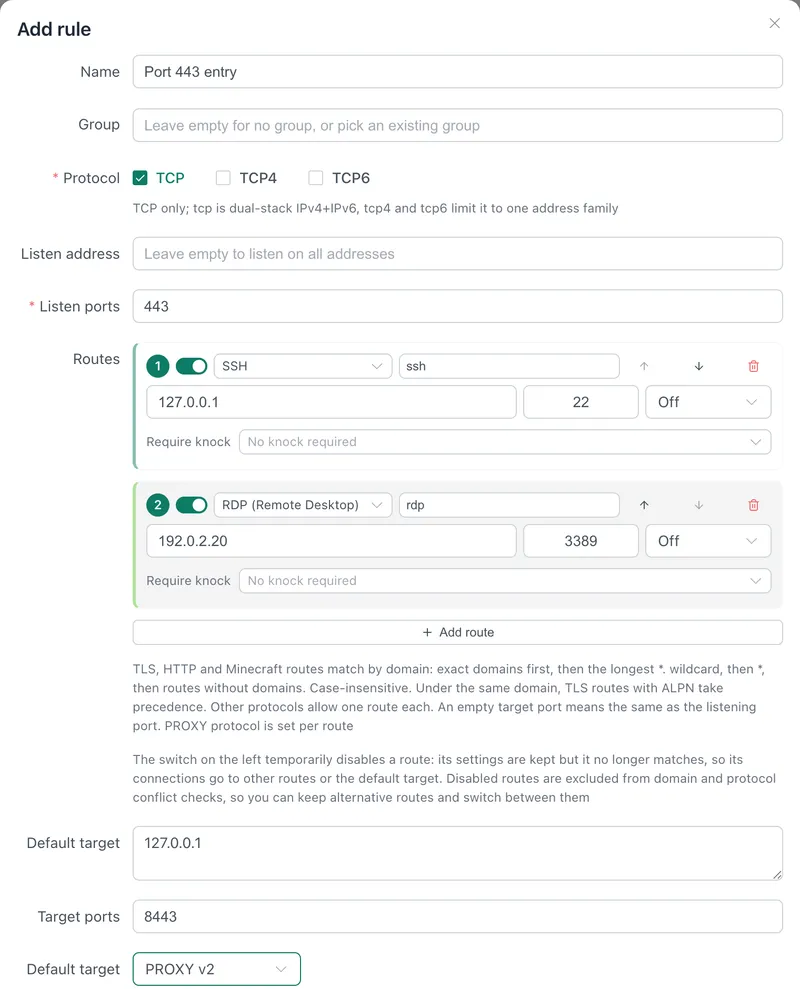
PROXY settings are per route and per default target, because some backends require the header and others reject it. To send different HTTPS sites to different backends, add routes with the protocol "TLS (SNI / ALPN)" and fill in the domains; see Protocol Routing.
3. Open port 443
- Cloud server: allow TCP 443 in the security group.
- Home network: forward external TCP 443 to this machine on the router.
- Gately on OpenWrt or on a Linux host with a firewall: turn on "Open firewall port" in the rule and Gately opens 443 in the local firewall.
- Websites, SSH and RDP all arrive on this one port, so 22 and 3389 stay closed.
4. Redirect port 80 to HTTPS (optional)
Add another listener in Web Services with an empty listen address, port 80 and HTTPS off. Add a site with the domain *, type "Redirect", target https://{host}, and tick "Keep path and query". After TCP 80 is open, http:// addresses are redirected to 443.
Verify
Test each service once, replacing nas.example.com and 203.0.113.10 with your domain and server address:
# Website: returns your application's page, with your certificate
curl -I https://nas.example.com/

# SSH over 443
ssh -p 443 user@203.0.113.10

# RDP: in Remote Desktop Connection enter 203.0.113.10:443
Confirm the routing and the real IP:
- The rule card shows a connection count for
ssh,rdpand the default target. Each test raises the matching number. - In the run log (level "All levels"), every connection's classification appears as a line such as
tls SNI "nas.example.com" ... -> 127.0.0.1:8443orssh -> 127.0.0.1:22. - For the real IP, turn on "Access log" in the site's settings or read the backend application's log. The source should be the visitor's IP, not
127.0.0.1. If the backend wants the address in a header, the site option "Add X-Forwarded-*" (on by default) writesX-Forwarded-ForandX-Real-IP, andX-Forwarded-Portcarries the entry port the visitor used.
Troubleshooting
The website shows 127.0.0.1 as the source. The default target's PROXY setting is not v2, or the backend is not a Gately Web listener with "Accept PROXY protocol" on. Both ends must agree. In the opposite case, a listener that expects PROXY while routing sends none, connections fail.
The site does not load and the log says it could not connect to the target. The default target's address or port differs from the Web listener, or the listener failed to start because no trusted source was set.
sshd logs only local addresses and shows 127.0.0.1. SSH has no PROXY header, so the SSH server sees Gately as the client. To restrict who can connect, set "IP access control" on the rule, or use Intrusion Prevention and Port Knocking. Do not point a log-based fail2ban at sshd here: it would ban 127.0.0.1.
VNC, MySQL or FTP do not get through. These protocols wait for the server to speak first, so the client sends nothing and Gately cannot classify it. Make one of them a "Wait timeout" route and set the sniff timeout to 0.3-1 second. Only one such service fits per port; details in Protocol Routing.
The site returns 404. The requested domain matched no site, so the Web Services default site handled it, and without a default site the answer is 404. Check that the site's domain equals the one you browse to.
Related
- Protocol Routing: supported protocols, matching rules, haproxy and sslh equivalents.
- Web Services: listeners, sites and the visitor's real IP.
- Wildcard certificate and DDNS.
- Replace haproxy, nginx, fail2ban and acme.sh on a cloud server.